Schedule the week.
Lose the spreadsheet.
Plan crews and jobs in one view, push assignments straight to worker phones, and keep your schedule, time clock, and payroll on the same record.
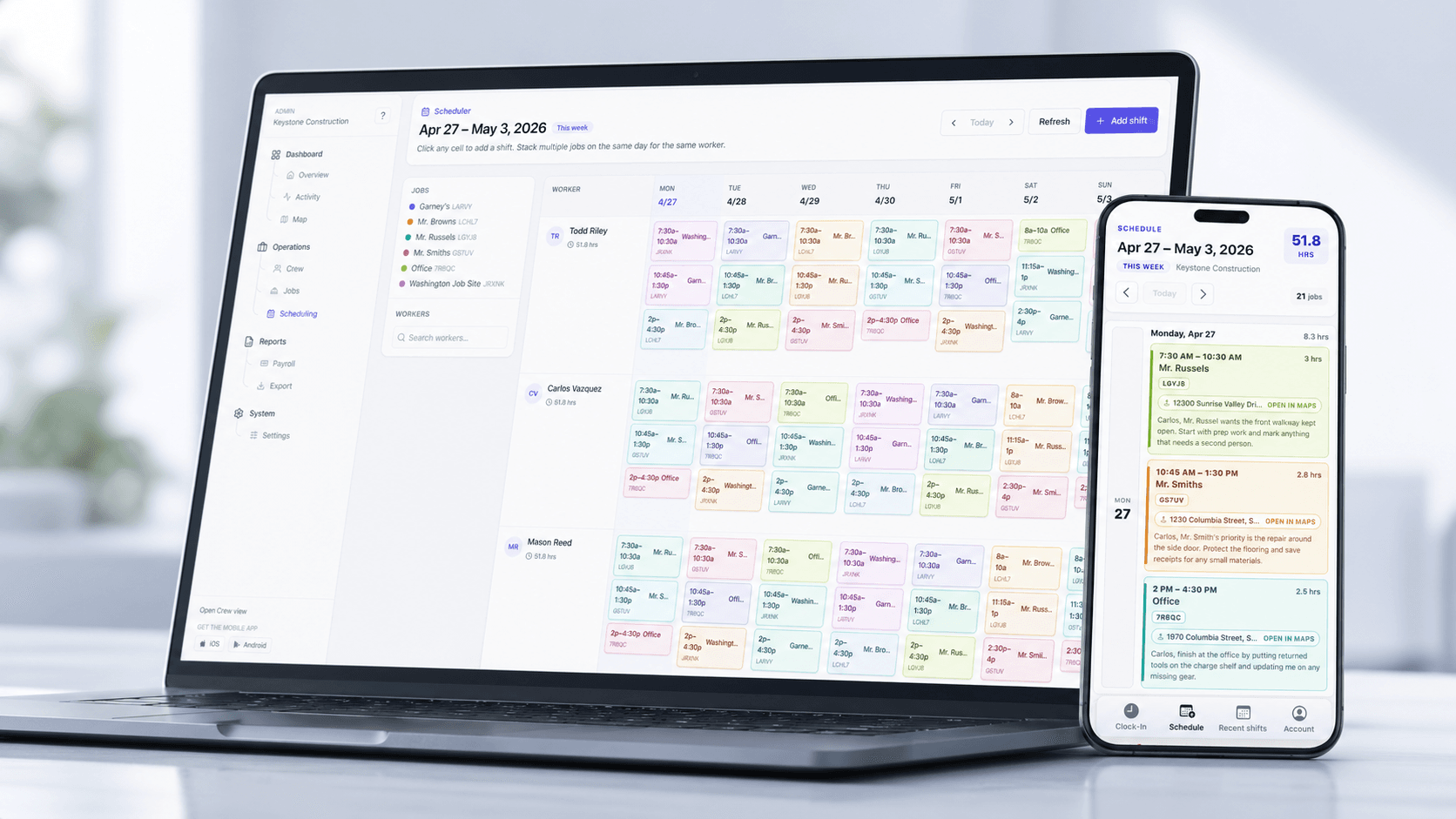
Better coordination
The gap between the schedule and the site.
Whiteboards, texts, and printed sheets look great on Monday morning. But when a job gets pushed, the plan is lost in translation. We connect scheduling directly to the time clock.
The Sunday-night rebuild
Spreadsheets get edited by three different people, then printed out before anyone notices the version is already stale.
Steve (Super): Wait, did we move the concrete crew to Oak Ridge or Pine Ave?
Bob (Super): I thought Oak Ridge was delayed? I edited the spreadsheet at 5 PM.
Mike (Foreman): I printed the sheet at 4 PM. Mine says Pine Ave. What is the plan?
The 6 AM phone tree
A job gets pushed and supervisors burn the morning calling, texting, and re-dispatching crews to the right address.
The hours nobody planned
Schedules say one thing, timesheets say another. Payroll spends Thursday reconciling who was actually where.
Steve (Super): Wait, did we move the concrete crew to Oak Ridge or Pine Ave?
Bob (Super): I thought Oak Ridge was delayed? I edited the spreadsheet at 5 PM.
Mike (Foreman): I printed the sheet at 4 PM. Mine says Pine Ave. What is the plan?
Inside Crewtrace Scheduling
Three jobs scheduling needs to do well.
Plan the week · 01
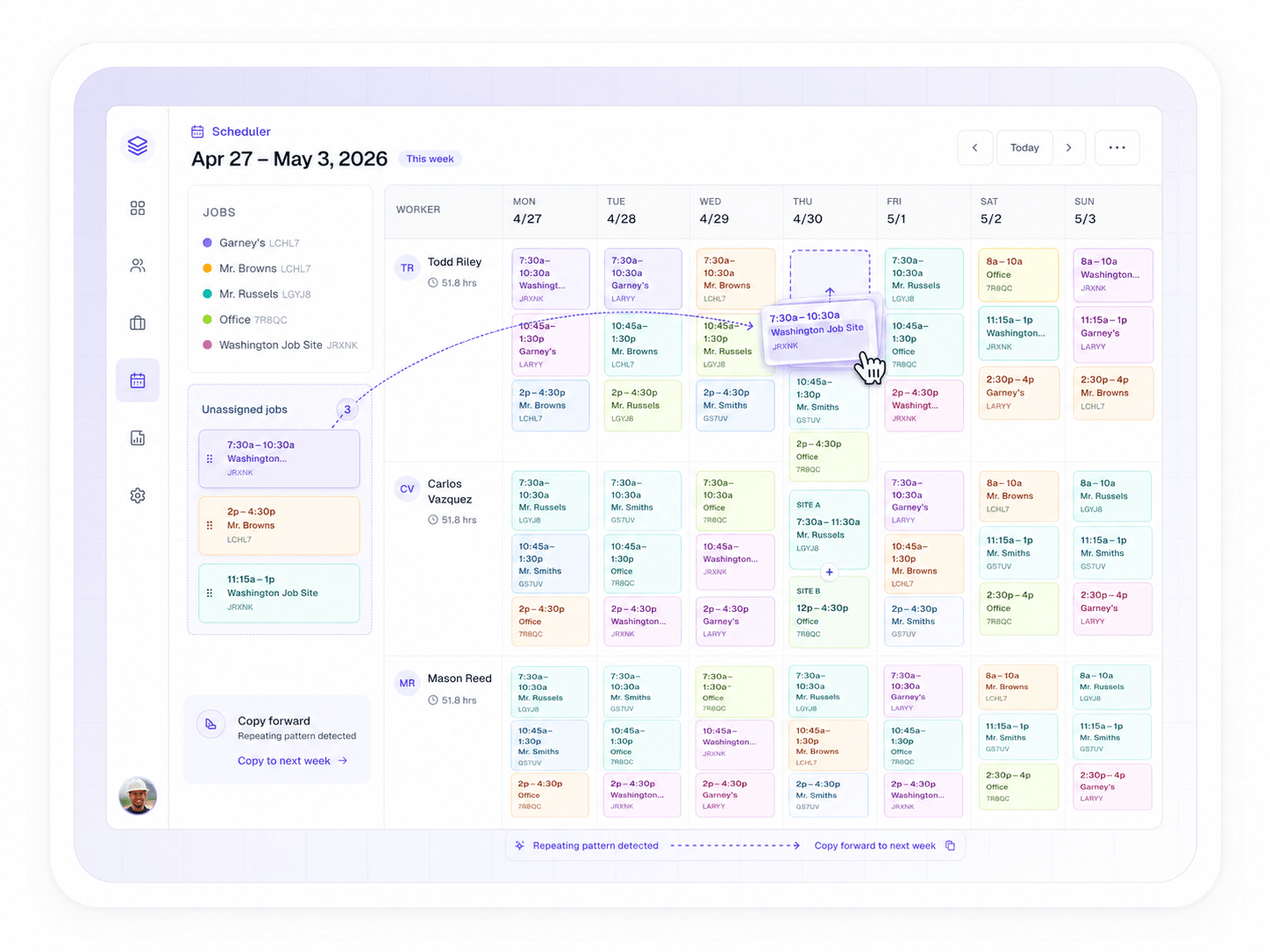
Drag, drop, dispatch.
Build the week in a single view. Move a crew between jobs, split a day across two sites, or copy last week's plan forward without reformatting a spreadsheet.
- Weekly grid by crew, job, or worker
- Copy-forward and template schedules
- Conflict and double-book detection
Push to the field · 02
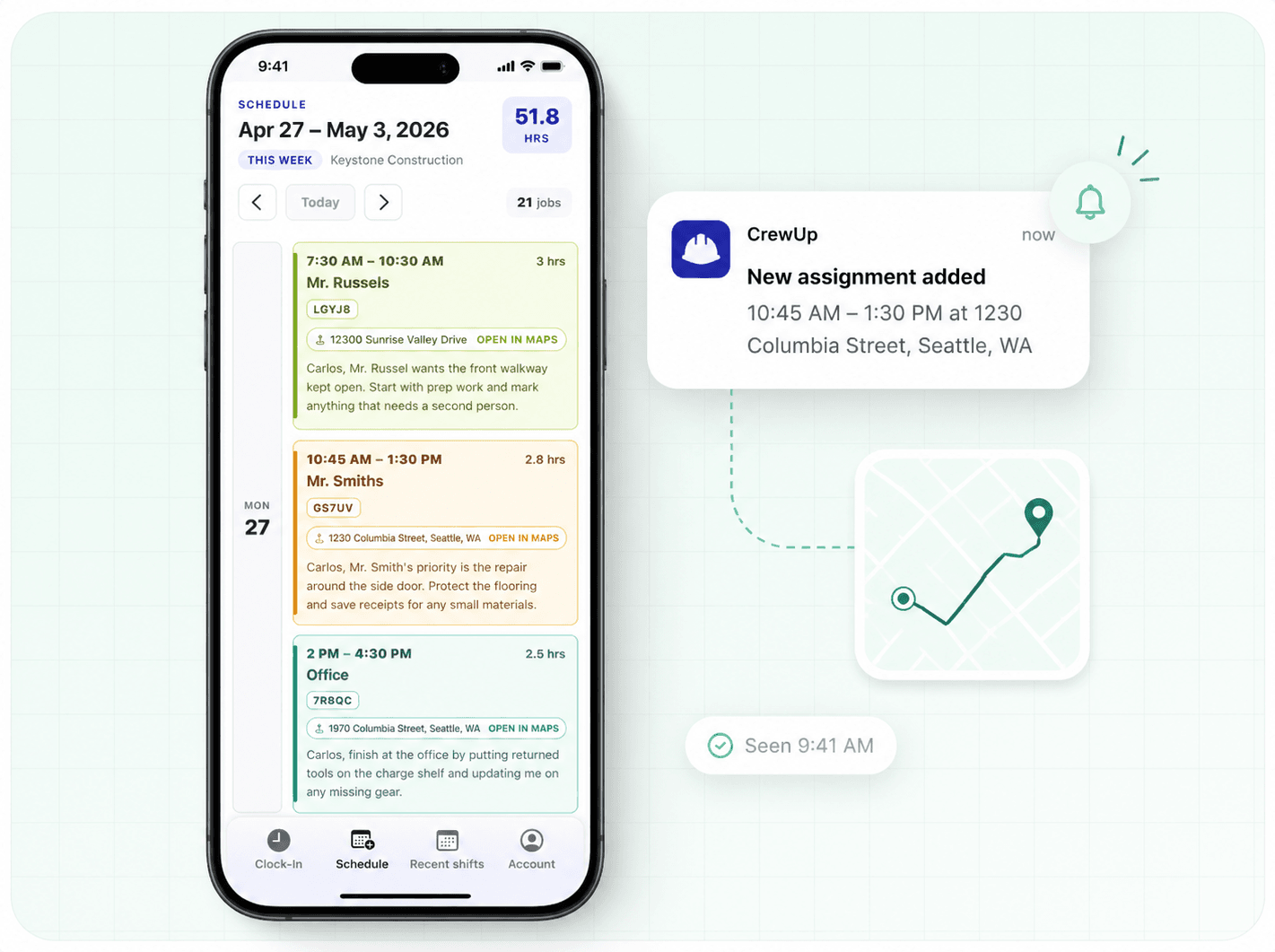
Crews see the plan on their phones.
Every assignment lands in the worker's app with the job address, reporting time, and supervisor. When the plan changes, their phone updates — no group chats, no morning phone tree.
- Push notifications for new and changed assignments
- One-tap directions to the job address
- Read receipts so you know who saw the change
Close the loop · 03
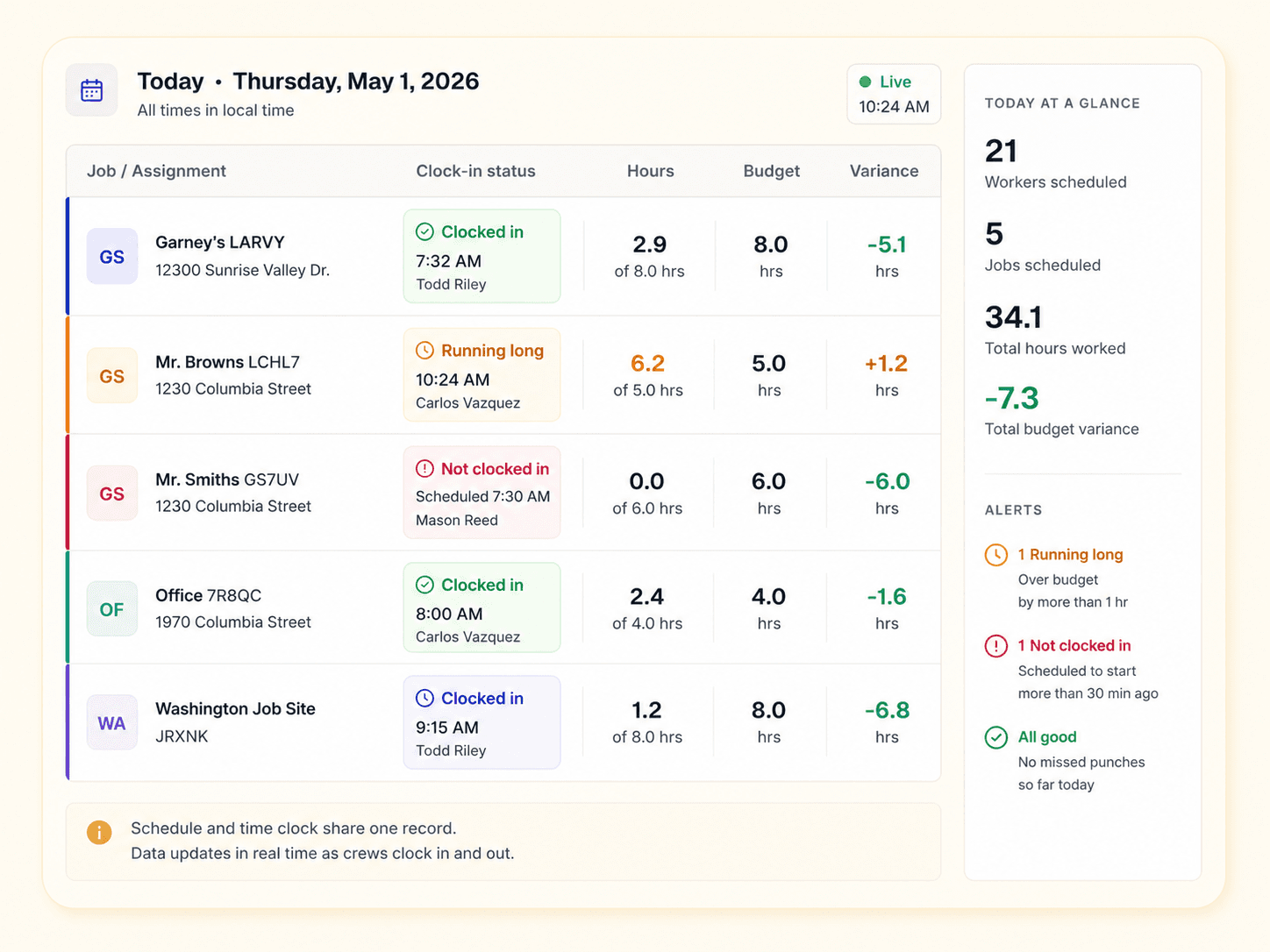
Know if the day is on track before payroll Thursday.
The schedule and the time clock share one record, so the moment crews start clocking in you can see who showed up, who's running long, and which jobs are about to blow their budget — while you can still do something about it.
- Live attendance against today's schedule
- Hour and budget variance flagged as it happens
- Approved hours roll straight into payroll exports
One connected workflow
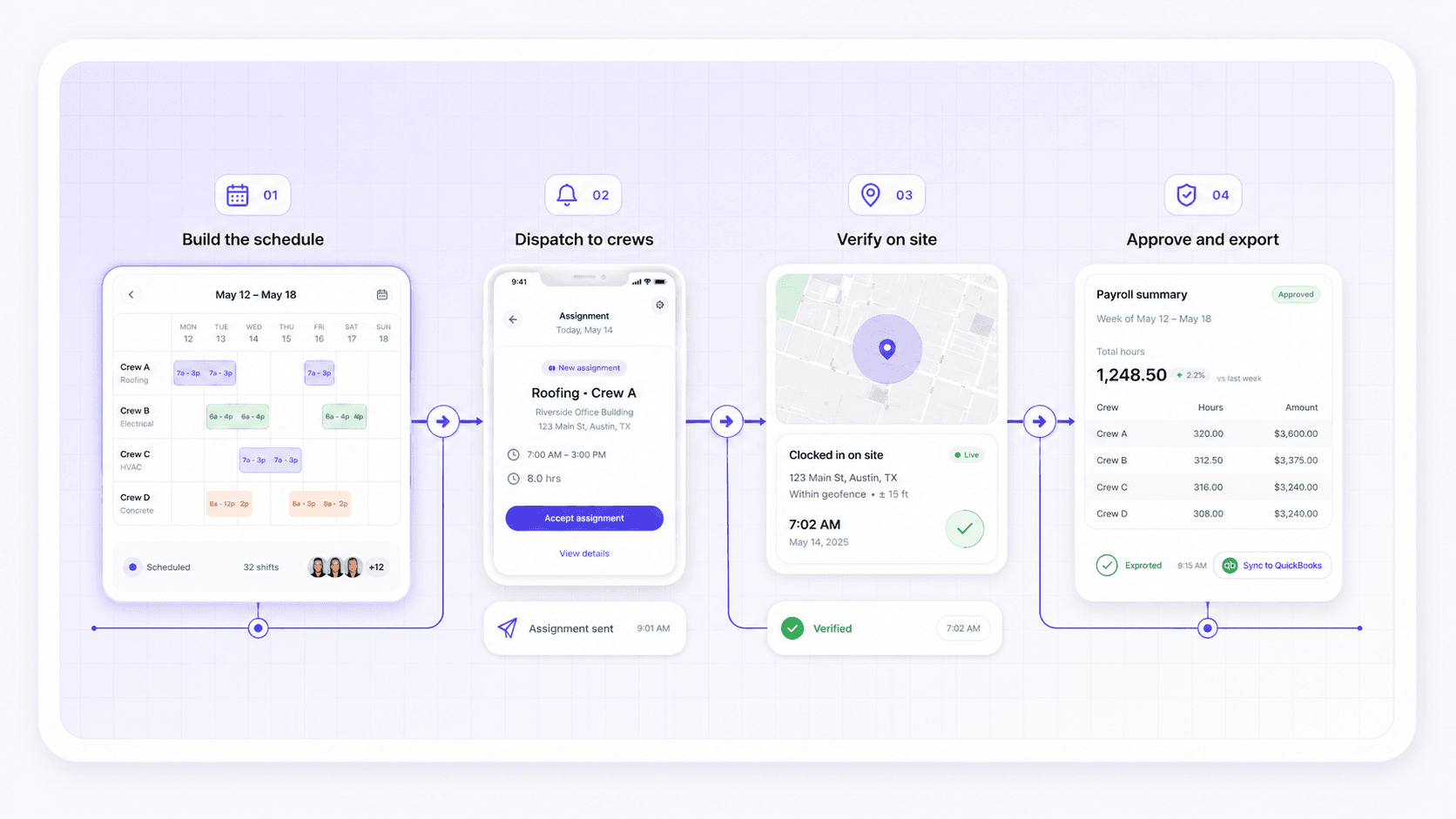
Plan, dispatch, verify, pay — on one record.
Scheduling isn't a side tool in Crewtrace. It's the front of the same pipeline that runs your time clock, payroll exports, and audit history.
Build the schedule
Drop crews onto jobs for the week. Templates and copy-forward speed up recurring routes.
Dispatch to crews
Workers get the assignment in the app. Schedule changes update on their phones automatically.
Verify on site
Crews clock in with GPS at the assigned site. Variances surface in real time, not on payroll day.
Approve and export
Approved hours flow into the payroll export. Schedule, clock events, and pay all from one record.
Spreadsheet vs. Crewtrace
The same scheduling job.
Two very different weeks.
Week one
The spreadsheet stack
Week two
Running on Crewtrace
Schedule + time clock
Two systems, manual reconciliation
Schedule + time clock
Same record. No double entry.
Field visibility
Group text or a printed sheet
Field visibility
Push notification + assignment card
Mid-week changes
Edit, re-print, re-text
Mid-week changes
Edit once, the field sees it instantly
Planned vs. actual
Reconciled after payroll
Planned vs. actual
Live, the moment crews clock in
Audit history
Whichever copy was saved last
Audit history
Every change preserved with timestamps
~6 hrs/week reconciling, re-printing, re-texting
One record. Schedule, clock, and payroll in sync.
Built for the field
Scheduling that fits how your trade actually runs.
Service routes that change three times before lunch
Dispatchers move techs between calls without losing time-on-job records.
See hvac workflowEmergency calls bumping the planned schedule
Reassign on the fly and keep planned vs. actual hours reconciled for billing.
See plumbing workflowMulti-stop crew routes with seasonal staffing
Build the week from a route template; new hires see assignments on day one.
See landscaping workflowCrews and subs spread across active job sites
One schedule covers employees and subs, with verified hours per project.
See general contractors workflowPhased rollouts where overtime sneaks in late in the week
Schedule against budgeted hours and catch overruns before they hit payroll.
See electrical workflowMulti-site weeks with shifting crew assignments
Move crews between sites without losing the audit trail of who worked where.
See construction workflowWhat contractors measure
Scheduling time you get back. Payroll noise you don't.
2 hrs
Saved building the weekly schedule
30%
Fewer dispatch escalations
0
Re-keyed timesheets after rollout
1
Record for schedule, time, and payroll
Scheduling questions, answered
Answers to common questions about crew scheduling software, rollout expectations, and how scheduling connects to time tracking and payroll.
A spreadsheet shows intent. Crewtrace scheduling is connected to the same record that captures clock events, GPS location, and approvals. When a crew is reassigned, the new job is reflected on their phone, and when they clock in, you immediately see scheduled hours versus actual hours instead of reconciling two different systems.
Yes. Once a worker is assigned to a job, they see the date, location, and reporting time directly in the Crewtrace mobile app. Schedule changes pushed by the office update on the worker's device automatically, so there is no group chat scramble when a job moves.
Supervisors can move a crew between jobs, swap workers, or cancel a shift directly from the schedule. Affected workers are notified, and the schedule history is preserved so you can see what was originally planned and what actually happened.
Yes. Scheduling, time tracking, and payroll exports all run on the same record. Scheduled hours can be compared to verified clock events, and the approved hours flow into your payroll export with no double entry.
All three. Most contractors build the week by job site first, then assign crews or individuals to that job. You can also pivot the view to see one worker's full week or one crew's coverage across multiple sites.